![$img['alt']](https://www.thinkarcoa.com/wp-content/uploads/2026/10/Retire-Old-Servers-Securely.jpg)
Server Recycling: How to Retire Old Servers Securely and Recover Their Value
Businesses should recycle old servers through a documented process that protects stored data, evaluates equipment for reuse or resale, and directs remaining hardware to responsible electronics recycling. Before equipment leaves your control, establish an inventory, choose appropriate data sanitization methods, and agree on the records your provider will deliver.
Whether you are upgrading a server room, moving workloads to the cloud, or closing a data center, retiring equipment requires planning. A server that no longer meets your needs may still have resale value. It may also contain sensitive information that needs to be addressed before it changes hands.
A thoughtful server retirement process brings those priorities together: data security, value recovery, and responsible disposal.
What Is Server Recycling?
Server recycling is the processing of retired server hardware to recover materials from equipment that will no longer be used. For businesses, it usually belongs within a broader IT asset disposition process that also addresses data sanitization, equipment tracking, and potential reuse or resale.
The distinction matters. Sending hardware for material recovery does not, by itself, explain how its stored data will be handled.
Before arranging server recycling, ask your provider how it will identify data-bearing media, document sanitization, evaluate reusable equipment, and report the final disposition of your assets.
Should Old Servers Be Reused, Resold, or Recycled?
The right destination depends on the equipment’s condition, usefulness, market demand, and your organization’s security requirements.
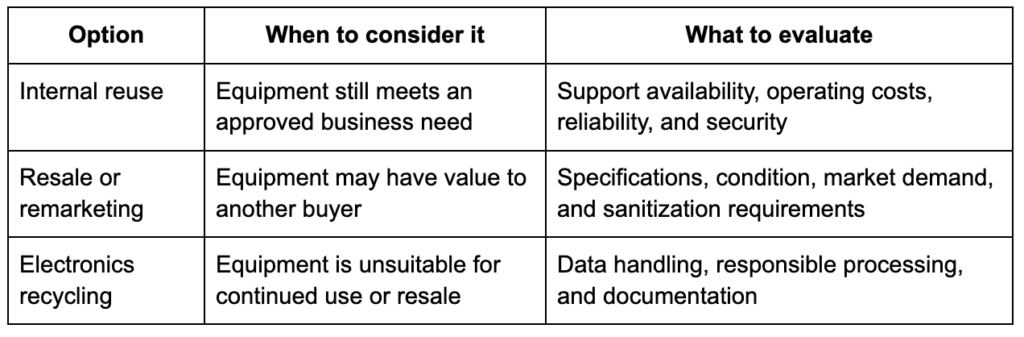
Avoid assuming that every retired server belongs in the recycling stream. Have equipment assessed before deciding its destination.
Likewise, do not assume that working equipment is automatically worth reselling. Ask for an evaluation that considers the costs of testing, handling, sanitization, and transportation alongside its potential value.
How Do You Prepare Old Servers for Recycling?
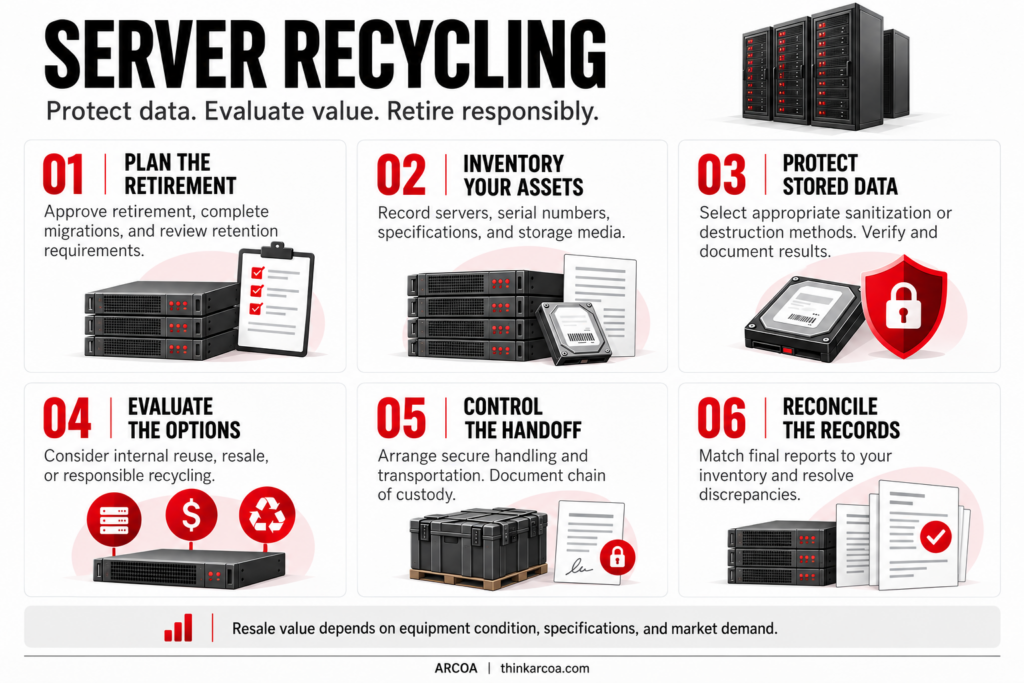
1. Confirm That the Equipment Can Be Retired
Have the appropriate IT owners approve retirement before disconnecting equipment. Confirm that required workloads have been migrated and that any necessary backups have been checked.
Review your organization’s data retention requirements before authorizing sanitization or destruction. The retirement plan should identify who can approve each step.
2. Create an Equipment Inventory
Record the servers and associated equipment included in the project. Useful details include:
- Manufacturer and model
- Serial number and internal asset tag
- Installed processors, memory, and storage
- Working condition and known damage
- Location and responsible department
- Data-bearing media associated with each asset
Keep track of drives removed from servers as well as those left installed. Your inventory should make it possible to reconcile what you release with what your provider receives and processes.
3. Establish the Data Sanitization Plan
Decide how data-bearing media will be handled before pickup. The plan should account for the media type, sensitivity of the information, intended equipment destination, and your organization’s policies.
NIST’s Guidelines for Media Sanitization, SP 800-88 Revision 2, provides guidance for developing a media sanitization program. Work with your IT security team and disposition provider to select and document appropriate methods.
4. Arrange Secure Handling and Transportation
Establish who will have access to the equipment while it awaits collection, who will release it, and how the transfer will be recorded.
Ask how your provider maintains chain of custody after accepting the assets. Agree on the records needed to track equipment through processing and resolve inventory discrepancies.
5. Review the Final Records
Reconcile the provider’s reports against your inventory. Follow up on missing assets, unexplained differences, or incomplete data sanitization records.
Retain the documentation according to your organization’s recordkeeping policies.
Do Server Drives Always Need to Be Destroyed?
Physical destruction is not required for every server retirement. The appropriate sanitization method depends on the storage media, the information it contains, its intended destination, and applicable security requirements.
NIST distinguishes between clear, purge, and destroy methods. The choice should be made through a defined sanitization process, rather than assuming one technique is suitable for every device.
Ask your provider how the selected method will be verified and documented. If your policies require destruction before media leaves your facility, discuss onsite options during project planning.
Removing a drive from a server also creates a separate asset to manage. Make sure it remains accounted for until its approved disposition is complete.
Can Businesses Recover Value From Old Servers?
Some retired servers may qualify for resale or remarketing. ARCOA evaluates equipment for recovery opportunities based on factors including age, specifications, and condition. Eligible equipment may be remarketed, which can help offset portions of a retirement project’s costs.
For planning purposes, ask for an assessment before budgeting for recovery proceeds. Request clarity on:
- Which assets may qualify for resale
- How equipment condition will be evaluated
- Which processing costs apply
- How recovery proceeds or credits will be calculated
- What happens to equipment that cannot be remarketed
Value recovery should be considered alongside data security requirements and the work needed to retire equipment properly.
What Documentation Should a Server Recycling Provider Supply?
Agree on reporting requirements before the project begins. Depending on your scope, request:
- An asset inventory or receipt
- Records of equipment transfers
- Media sanitization or destruction records
- Final disposition information
- Resale or recovery accounting, when applicable
- Recycling documentation for remaining equipment
Ask whether reporting identifies individual assets and media by serial number. A general receipt may not provide enough detail to reconcile your inventory or satisfy internal review requirements.
Also confirm what certifications cover the facility and services handling your equipment. Ask how relevant certificates can be verified.
Server Retirement Checklist
Before releasing old servers, confirm that you have:
- Approved equipment retirement and completed necessary migrations
- Reviewed backup and data retention requirements
- Inventoried servers and associated storage media
- Established sanitization methods and verification requirements
- Requested an assessment of potential resale value
- Arranged controlled storage, collection, and transportation
- Agreed on chain of custody and final reporting
- Assigned someone to reconcile the completed project records
Plan Your Server Retirement With ARCOA
ARCOA helps businesses manage retired servers through IT asset disposition and data center decommissioning. Services include data sanitization or destruction, asset evaluation and remarketing, electronics recycling, and project documentation. Onsite data destruction is also available for organizations with specific security requirements.
Planning a server refresh or retiring data center equipment? Contact ARCOA to discuss your inventory, data security requirements, and opportunities to recover value from eligible hardware.
RELATED INSIGHTS

Hardware Lifecycle: When to Retire IT Equipment
Business IT equipment typically goes through the same journey: you buy it, use it, and maintain it, and eventually...

What is HIPAA-Compliant Data Destruction and Why Does It Matter?
When it’s time for healthcare organizations to retire old IT equipment containing protected health information (PHI), it’s not enough...
LET’S GET STARTED
Ready to put your retired IT assets to work for your business? Contact us to get the conversation started or request a quote. ARCOA has all the solutions you need to turn old IT assets into new revenue.
Talk to an Expert